Kovaila software suite

Kovaila Business Suite

Run the entire business around the relationship, not disconnected tools.

Kovaila Business Suite brings CRM, sales, marketing, projects, operational workflows, financial activity, reporting and guided intelligence into one relationship-centered environment. Replace separate operational tools where the native capabilities meet your needs, connect existing software through supported APIs, or combine both approaches.

Focused operational tools, connected intelligence and a continuous record of your work.

In the product

The software, at a readable size.

All screens on this site are from a demonstration company with fictional people and figures.

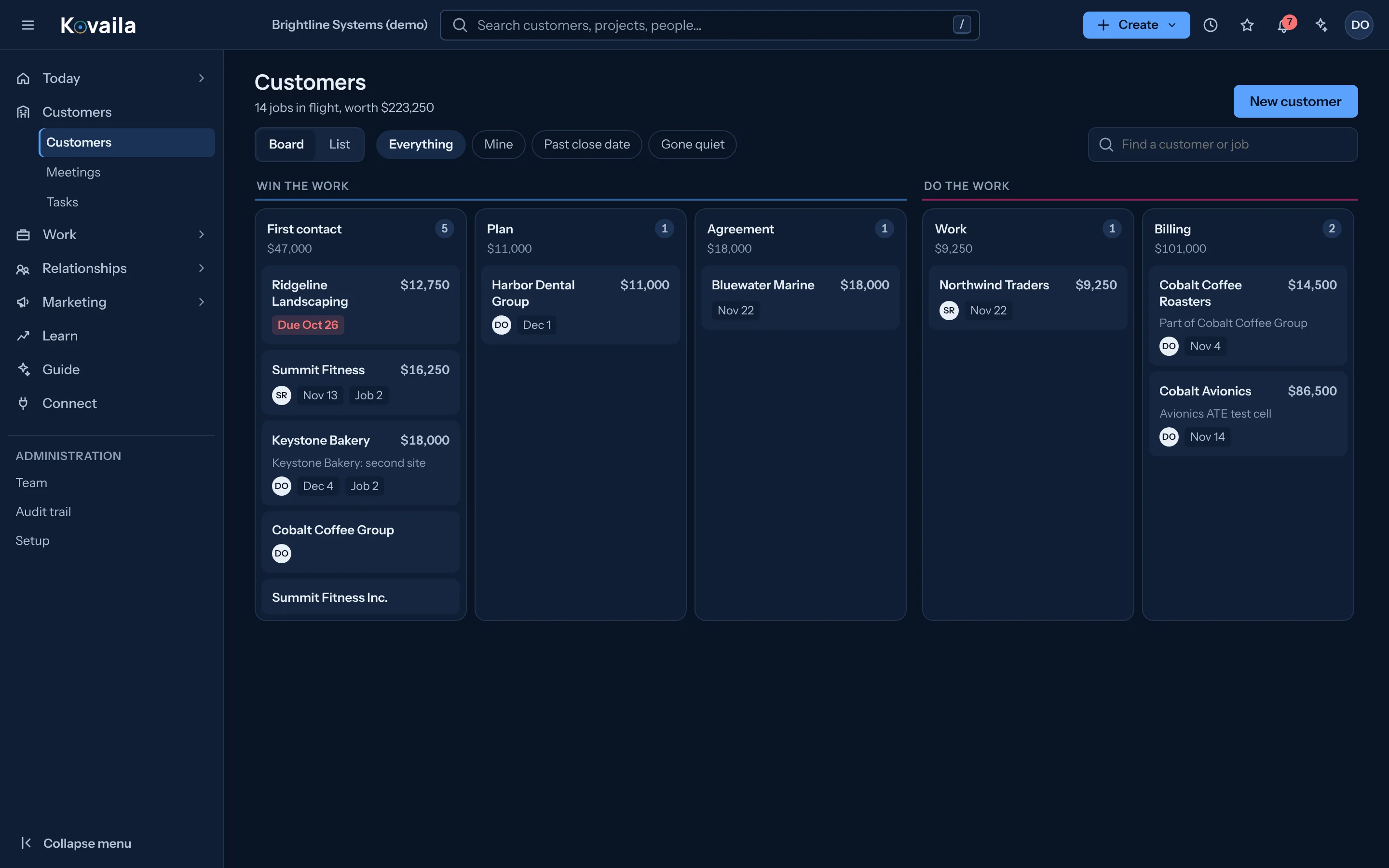
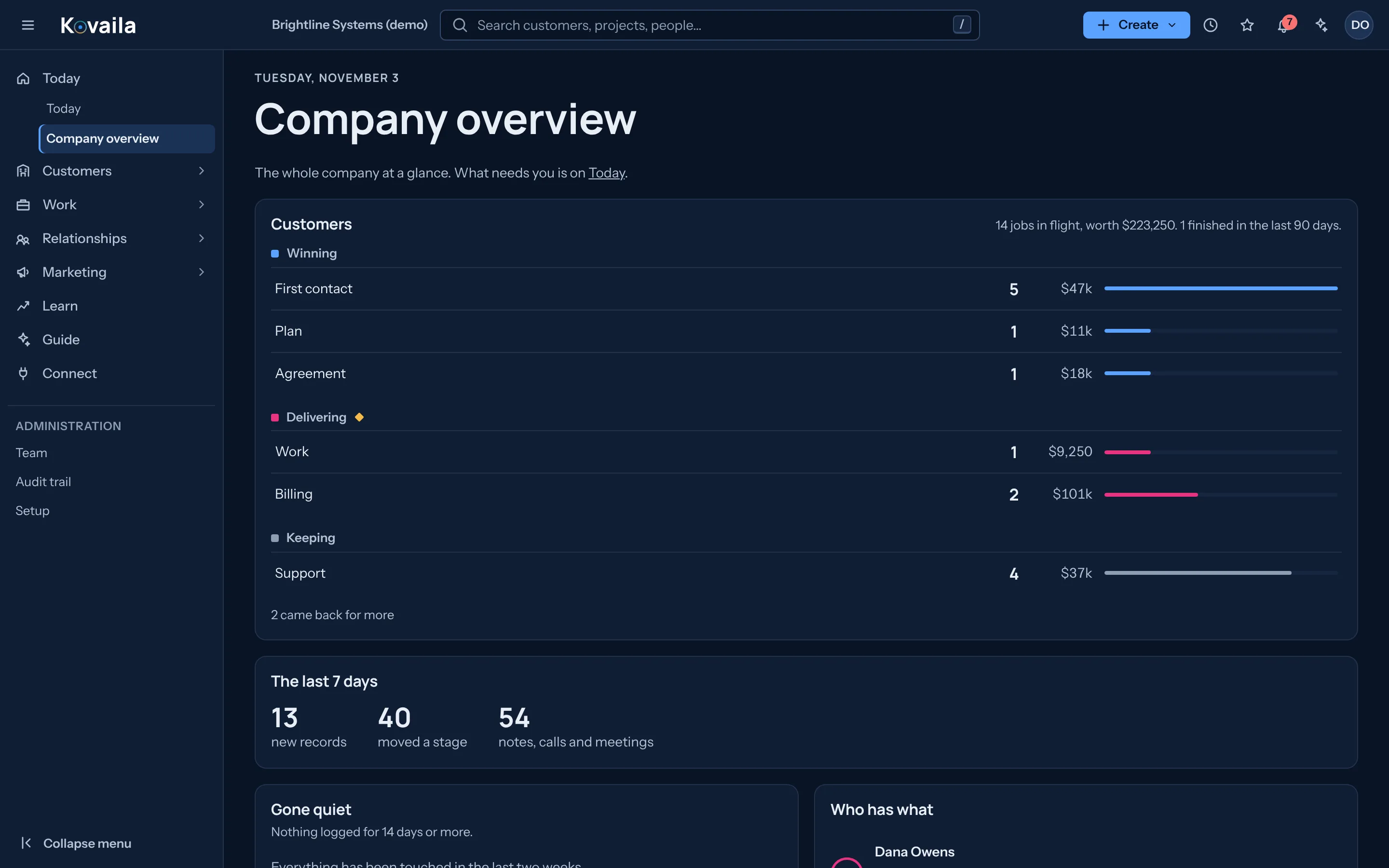
Company overview showing customers by stage with job counts and value, and the last seven days of activity.
Company overview: every customer by stage, with value and activity.
The persistent core

Every tool adds to the same record.

A conventional application organizes work by module, so people move between systems and rebuild the story. In the Business Suite each tool connects its activity, decisions and results to one continuing record of the customer. That history is what lets Kovaila learn, analyze, guide and measure.

Learnfrom operational activity
Analyzepatterns and outcomes
Guidetoward better decisions
Measurethe results, and keep the learning
  • RecordOne per customer, client or program. Deals, jobs, projects, meetings, invoices and promises hang off it.
  • HistoryInsert-only. A correction is a new entry, so the earlier one is never rewritten.
  • IdentityPeople, organizations and the roles they hold over time, kept when someone moves on.
  • LineageHow one thing led to another: a lead became a quote, a quote a project, a milestone an invoice.
  • DecisionsApprovals and confirmations by named people, with the evidence they used.
  • OutcomesEstimates against actuals, and promises kept or missed.
  • VisibilityLinks between records are shown only to people who can see both ends.
One relationship, start to finish

From first contact to what you learned.

Follow a fictional customer through Kovaila. Each step happens on the same record, in the same tools, so nobody rebuilds the story.

Relationships and Sales Available
Step 1 of 7: A lead form creates the record.

Illustrative screens drawn from the Business Suite’s real screens and capabilities. The customer, people and figures are fictional. Figures are fictional.

Connect, operate or combine

One complete operating suite. Your choice of how to use it.

Kovaila provides its own operational tools as well as ways to work with software you already own. Consolidate CRM, project and workflow tools where the native capabilities fit. Keep specialized systems and connect them through supported APIs when that approach is right for you.

Connect

Keep the software you already use.

Use supported API integrations and imports to bring context from your CRM, project management, accounting, ERP and other systems into Kovaila’s persistent operational record.

  • Keep existing user workflows where appropriate
  • Connect authorized information through supported APIs and imports
  • Preserve source context and permissions

Integration depth depends on the source system and available API capabilities.

Operate

Make Kovaila your daily operating environment.

Use an integrated suite of native tools for CRM, sales, project and issue management, approvals, meetings, marketing, financial operations, reporting and guided decisions. ERP-style workflows connect resources, commitments and delivery.

  • Operate from one persistent relationship-centered record
  • Consolidate tools as capabilities match your requirements
  • Give teams focused workspaces rather than a maze of disconnected screens

A full native software suite, not merely an analytics or connector product.

Combine

Replace what makes sense. Connect the rest.

Keep a specialized accounting or ERP system, move CRM and project workflows into Kovaila, or choose a different combination. Connected activity is linked to the appropriate record with traceable source information.

  • No mandatory all-at-once migration
  • Adopt native tools selectively
  • Maintain data provenance and access controls

Choose the mix that fits your operation and existing integrations.

Explore connections

Who it is for

Service, project and professional-services organizations that run on customer relationships.

Customer history is scattered

What happened with a customer lives in email, a CRM, a spreadsheet, a project tool and someone’s memory. When people move on, it moves with them.

Risk shows up late

A champion changes jobs, a sponsor goes quiet, a milestone slips. Each is visible somewhere, but nobody sees them together until a deal or project is already in trouble.

Won work is not delivered cleanly

Details agreed in sales are re-asked in delivery. Handoffs lose context, and billing finds out last.

What it does

Capabilities that connect.

A single customer record

Contacts, organizations, deals, quotes, invoices, meetings, notes and projects attach to one record, so the full picture is one click away.

One suite, three ways to work

Run daily operations in Kovaila, connect existing systems through supported APIs, or combine native and external workflows without forcing an all-at-once migration.

What Changed

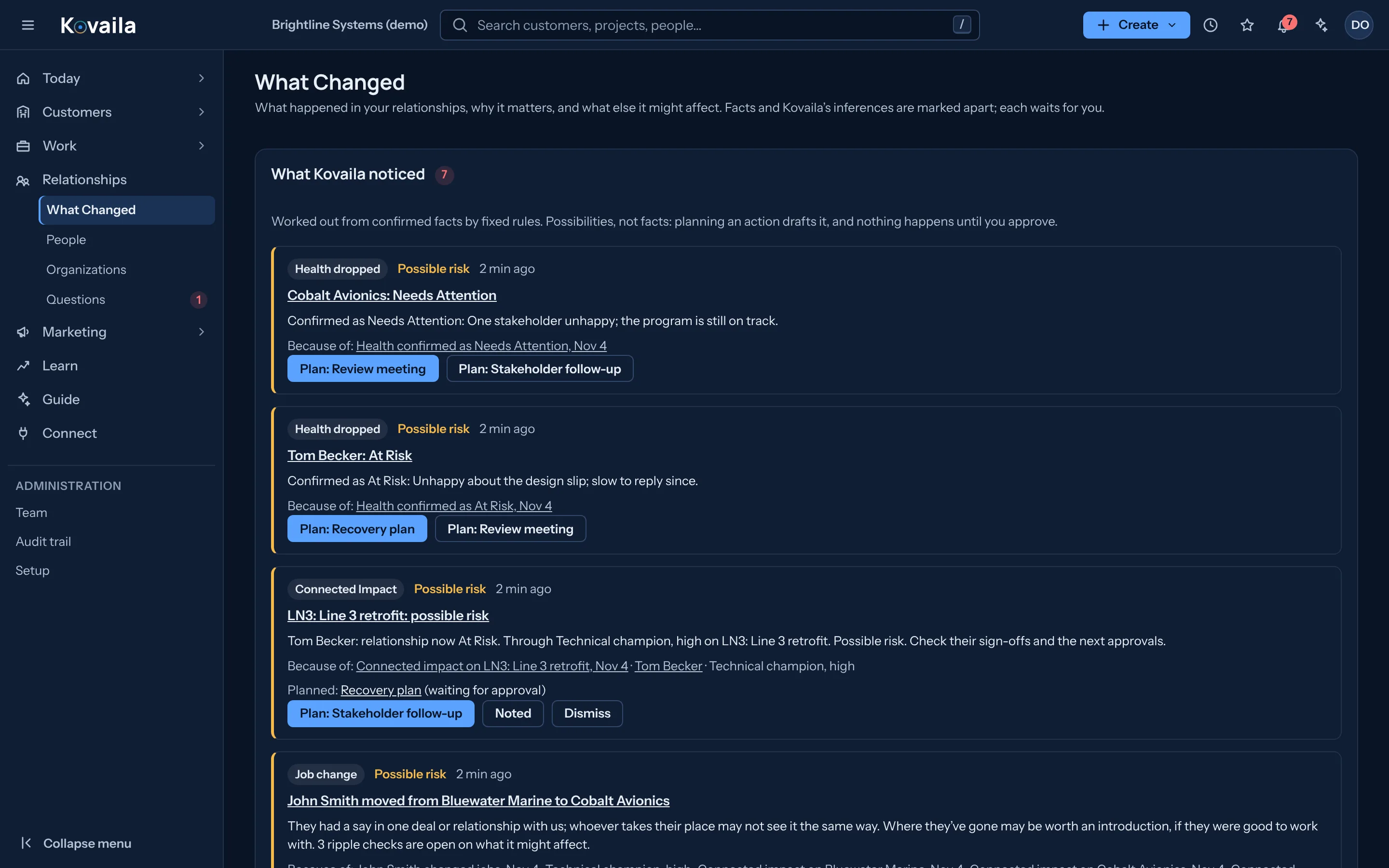
Relationship health with its reasons. Facts and Kovaila’s inferences are marked apart, and each suggested action waits for a person to approve it.

Work from win to delivery

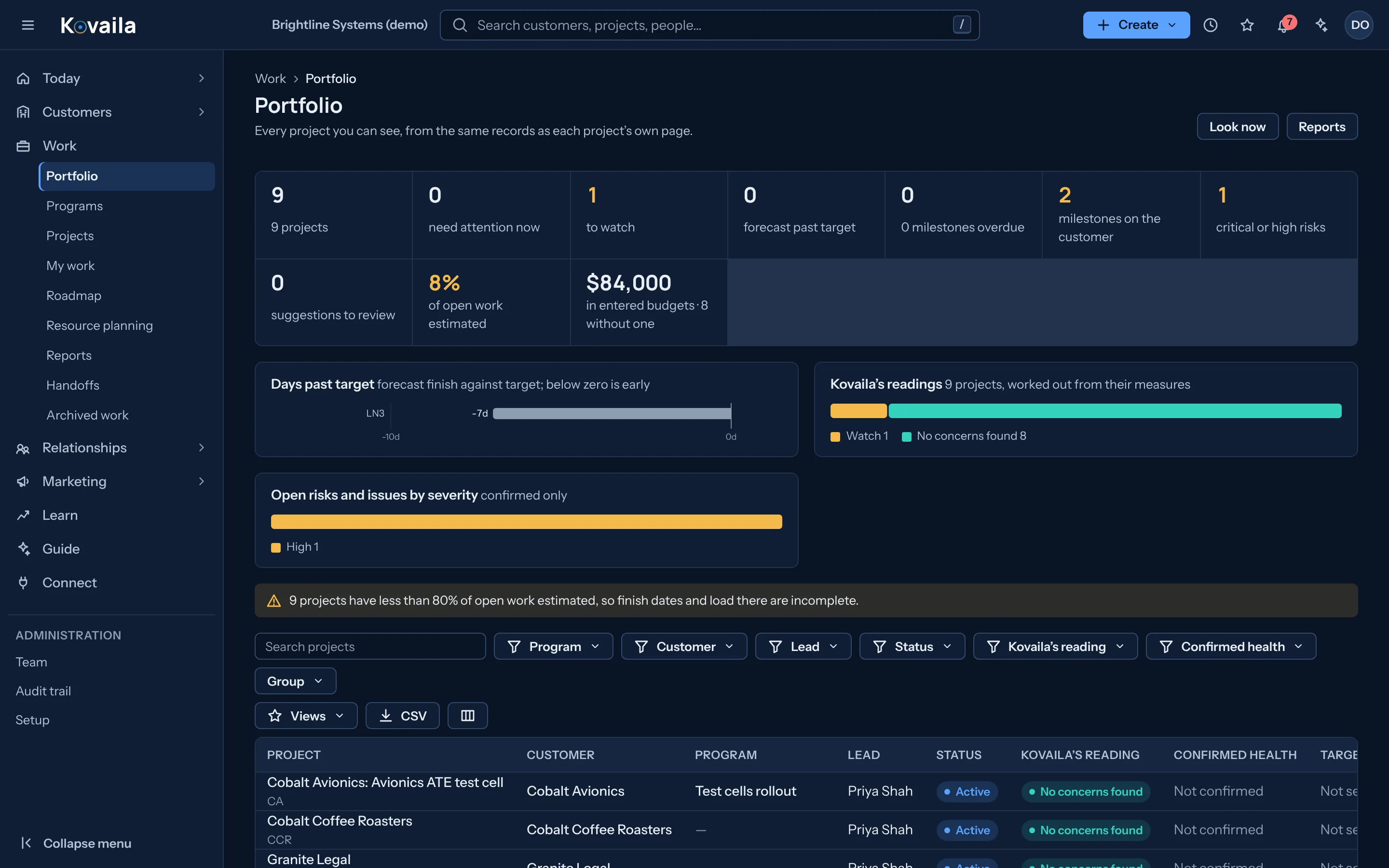
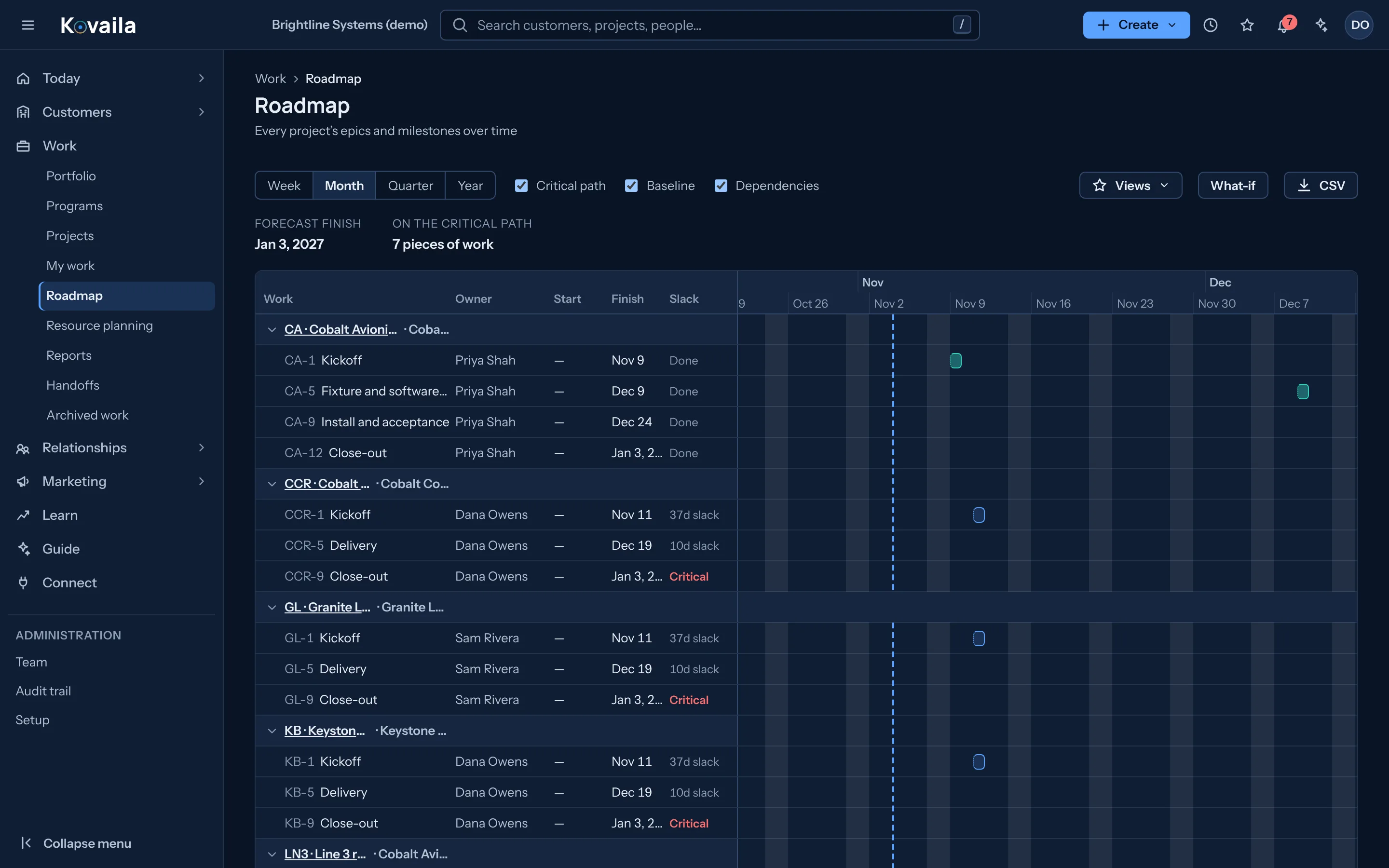
Projects, schedules with dependencies, milestones customers sign, baselines, risks, capacity and time off. A won deal hands off to delivery with its context intact.

Today

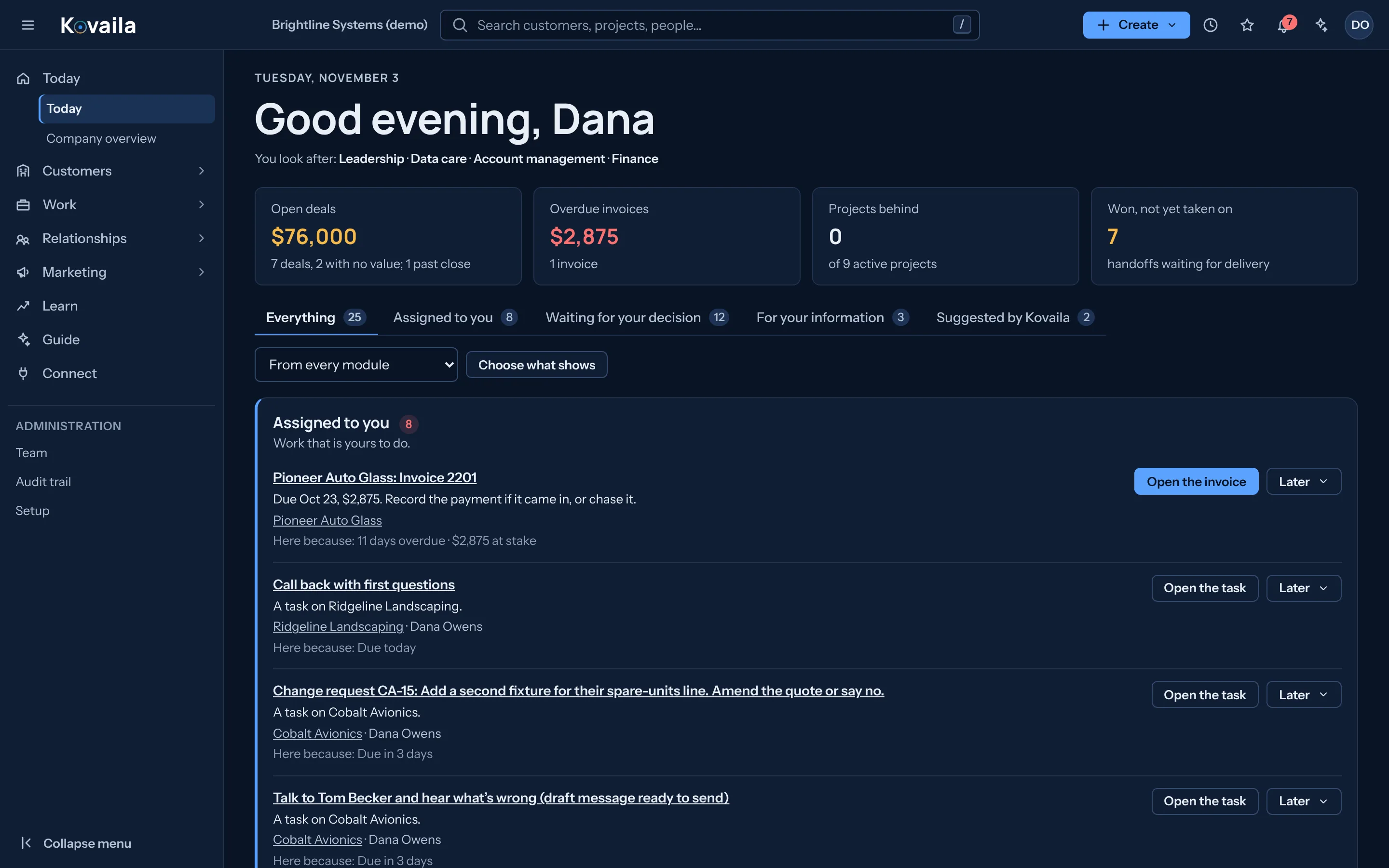
One list of what needs you: assigned work, decisions waiting, notices and suggestions, ordered by what matters.

Connected financial operations

Quotes, commitments, billing workflows, time, payments and financial visibility follow the relationship and work. External accounting and ERP systems remain options when specialized requirements apply.

An audit trail

Who changed what and when, kept with the record.

The Relationship Management Center

Capabilities built around the relationship

Explore the tools that bring customer relationships, work and operational decisions into one connected environment.

RelationshipsWho is involved, how healthy the relationship is, and what changed.5 capabilities
  • People and organizations

    Contacts, organizations and the roles people hold over time, kept when a person leaves or changes jobs.

  • Relationship health and influence

    Health with its reasons and who influences the decision. A person confirms; Kovaila only proposes.

  • What Changed

    Flags a job change, a gone-quiet contact, a promise coming due or a health drop. These are fixed rules, not a prediction model.

  • Needs, signals and consent

    Records durable customer needs with the evidence behind them, and a consent ledger that checks permission before contact.

  • Duplicate handling

    Near-matches become a question for a person ("Is this the same?"). Merges keep what moved and can be split.

SalesFrom first conversation to agreement, on the customer record.4 capabilities
  • Deals and pipeline board

    Several deals, jobs or orders can be open on one customer, each with its own stage, value and close date.

  • Quotes

    Quotes kept with the deal and the record they belong to.

  • Lead forms

    Public forms that create records, with consent captured at the source.

  • Saved lists and views

    Filter, group and save the lists a team works from.

Projects and deliveryWhat was sold becomes work, with the context intact.4 capabilities
  • Handoff to delivery

    A won deal starts a delivery project with a brief. The delivery lead accepts it or sends back a question.

  • Project workspace

    Board, list, timeline, goals and milestones, risks and issues, resources, files and financials per project.

  • Scheduling

    Dependencies, critical path, baselines, calendars, holidays and time off.

  • Portfolio and programs

    Projects across the company, with workload against capacity and reports on schedule, milestones, risks and acceptance.

Meetings and communicationWhat was said and decided, kept with the customer it concerns.5 capabilities
  • Meeting recording and transcripts

    Record in the browser or upload, with consent confirmed each time. Speaker separation and synced playback.

  • Notes, decisions and proposals

    AI-written notes checked against the transcript, with proposed tasks and changes that wait for a yes.

  • Voice conversation with the assistant

    Ask and hear answers hands-free.

  • Email and calendar capture

    Pull customer email and meetings in automatically.

  • Phone calls and Zoom or Teams join

    Log phone calls and join video meetings.

MarketingDemand activity tied to the customers it affects.3 capabilities
  • Audiences, programs and offers

    Audiences where each member shows why they are in. Programs with an owner and budget.

  • Consent-checked email

    Bulk email approved by a person, with every send checked against consent and unsubscribes honored.

  • Account-based plans

    Target accounts with buying-group coverage computed from confirmed influence.

FinanceCommitments and billing beside the relationship and the work. Not an accounting system.4 capabilities
  • Commitments and billing plans

    Versioned commitments and when money becomes billable. Approved versions cannot be edited; changes are change orders.

  • Invoice drafts and payments

    Drafts from completed work, an approved snapshot, payments allocated to lines.

  • Accounting posting

    Post invoices to QuickBooks Online.

  • Receivables worklist and reminders

    Aged receivables, reminders and history.

Operations and workflowThe way your organization works, written down once and followed.5 capabilities
  • Today

    One worklist per person from their responsibilities: decisions waiting, assigned work and suggestions.

  • Approvals

    Approval policies with stages, deadlines, escalation and delegation. Gates are enforced in the database.

  • Workflow engine and designer

    Versioned workflows with branches, triggers and recovery, drawn in a visual designer.

  • Operating templates

    Starting setups for engineering services, professional services and small teams.

  • Links between anything

    Typed links between records, projects, meetings and people, shown only to those who can see both ends.

Guidance and learningUse the history to guide the next decision, then check what happened.5 capabilities
  • Company overview

    Every customer by stage, who has gone quiet, who owns what.

  • Planned actions

    Recovery plans, follow-ups and reviews drafted from the history. Nothing happens until a person approves; approvals can be undone.

  • Trace

    Follow any result back to where it came from and forward to what it led to. Hidden steps are counted, never named.

  • Learn

    Compares estimates with actuals once at least three jobs are finished, and projects open jobs.

  • Guide and assistant

    Ask questions of the record, get summaries and a weekly report. The assistant can act for the person who asks, with undo.

Administration and controlWho can do what, and a record of what was done.7 capabilities
  • Roles, teams and guests

    Custom roles, teams, guest and temporary access, and an access review.

  • Sign-in security

    Authenticator-app second step (required by company setting), sign-in throttling.

  • Audit trail

    A tamper-evident trail of changes that can be checked.

  • Support access

    Customer-approved, time-limited access for Tessellaite support.

  • One address per organization

    A single address for each organization, with each suite beneath it.

  • Restrictions by team, project or field

    Limit what people see by team, project or individual field.

  • Single sign-on

    Sign in through the customer’s identity provider.

Connect the systems your organization relies on

Kovaila supports a native operating environment alongside approved imports and external connections. CRM, project management, finance, and other systems can contribute to the core when the required APIs, permissions, and supported integrations are available.

SystemTypical recordsIntegration approachConsiderations
HubSpot Contacts and operational activity Import or API-based connection Availability and supported operations depend on the system, subscription, permissions, and connector configuration.
Pipedrive Contacts and operational activity Import or API-based connection Availability and supported operations depend on the system, subscription, permissions, and connector configuration.
Jira Projects and work Import or API-based connection Availability and supported operations depend on the system, subscription, permissions, and connector configuration.
QuickBooks Online Customers, invoices, payments Import or API-based connection Availability and supported operations depend on the system, subscription, permissions, and connector configuration.
Salesforce Contacts and operational activity Import or API-based connection Availability and supported operations depend on the system, subscription, permissions, and connector configuration.
Microsoft Dynamics 365 Contacts and operational activity Import or API-based connection Availability and supported operations depend on the system, subscription, permissions, and connector configuration.
Zoho Contacts and operational activity Import or API-based connection Availability and supported operations depend on the system, subscription, permissions, and connector configuration.
monday.com Projects and work Import or API-based connection Availability and supported operations depend on the system, subscription, permissions, and connector configuration.
Asana Projects and work Import or API-based connection Availability and supported operations depend on the system, subscription, permissions, and connector configuration.
Xero Customers, invoices, payments Import or API-based connection Availability and supported operations depend on the system, subscription, permissions, and connector configuration.
Google Workspace Contacts and operational activity Import or API-based connection Availability and supported operations depend on the system, subscription, permissions, and connector configuration.
Microsoft 365 Contacts and operational activity Import or API-based connection Availability and supported operations depend on the system, subscription, permissions, and connector configuration.

An available API does not guarantee a complete integration. Data access, synchronization, authentication, rate limits, and write permissions depend on each vendor.

All screens on this site are from a demonstration company with fictional people and figures.

  • Request a guided walkthrough of the Business Suite using your organization’s workflows.

See Business Suite against your operation.

Tell us what you run and we will show you what it would change.